Event feedback form: the questions that tell you what to change
Rate the event yourself in the preview, pick five questions or ten, add questions for workshops, online sessions or catering, and open the finished form in the builder with its scales already set. Print it for the exit table, or run a one-question poll before people leave.
- 5 or 10questions to start from
- 12extras for your format
- 0 to 10recommend scale built in
- 1 pageprintable version
By Michael Hodge, BSc Psychology Updated 23 September 2026
The ten questions and the reason for each
The short version asks five questions: two scores, two open questions and one about coming back. The full version adds three ratings, a role question and an optional email. Use the Short and Full buttons on the preview; whichever is selected is what the builder receives.
| Field | Why it is on the form |
|---|---|
| Overall, how would you rate the event? 1 Poor to 5 Excellent | The headline number. Asked first, while the whole event is in mind, and on five points so it can be compared across every event you run. |
| How likely are you to recommend this event to a friend or colleague? 0 Not at all likely to 10 Extremely likely | The Net Promoter question, asked on its standard 0 to 10 scale so your score means the same as everyone else's.3 It measures whether people would put their name to the event, which a satisfaction score does not. |
| What was the most useful part? | Tells you what to protect next time. Optional, like both open questions, because written answers are skipped far more often than ratings.1 |
| What is one thing we should change next time? | "One thing" forces a priority, and "change" gets a fix you can act on instead of a list of complaints. |
| Would you come to our next event? Yes / Maybe / No | A plain intention question that sits beside the score. If the ratings are high but many people answer Maybe, ask about topics and timing next time. |
| How relevant was the content to you? 1 Not relevant to 5 Very relevant | Separates a good event from a good event for this audience. Low relevance with high ratings points at who you invited, not at what you ran. |
| How would you rate the speakers? 1 Poor to 5 Excellent | One rating for all speakers keeps the form short. Add a line per speaker from the list below if you need to thank or brief them individually. |
| How well organised was the event? 1 Badly organised to 5 Very well organised | Covers registration, timing, signs and information: everything that is your team's doing rather than the speakers'. |
| Which best describes you? Attendee / Speaker / Sponsor or exhibitor / Volunteer or staff | Sponsors and speakers see an event differently from the audience. Splitting the results by role stops their answers from blurring the picture. |
| Email, if you are happy for us to follow up | Optional, and the label says why it is there. Anyone who leaves an address is inviting a reply, so make sure someone answers. |
Extra questions by type of event
Tick what fits your event. Each one joins the preview immediately and travels to the builder with the rest.
Conferences and talks
Workshops and training
Online and hybrid sessions
Venue, food and getting there
Planning the next one
Collecting feedback the same day
The form reaches the builder with its scales and required questions set. This is how to get it answered.
- 1
Rename it and say how long it takes
Put the event name in the title and keep the intro to one line that says how many questions there are. People start a form they can see the end of.
- 2
Put the QR code on the last slide
After publishing, add the QR code to your closing slide and the exit table. People can answer on their phones while they queue for coats, with the day still fresh.
- 3
Send the link before the day is over
Email everyone who registered within a few hours, with one line of thanks and the link. A week later, people remember much less of the day.
- 4
Read it question by question
Each response shows up in your dashboard as soon as it is sent. Read the two open questions in full; they are where the next event gets better.
Feedback you can act on
Most event feedback forms ask too much and learn too little. Three decisions fix that.

Scores first, words second, and only two open questions
In one web survey experiment, 99 to 100 percent of respondents answered the closed questions but only 79 percent answered the open one.1 Later questions also get faster, shorter answers than early ones.2 So the ratings come first, and the form keeps just two open questions, both optional, both worth reading.


Ask what to change, and ask for one thing
"Any other comments?" collects thanks and venting. "What is one thing we should change next time?" collects a ranked to-do list: people name the thing that mattered most to them, and the same answer from ten people is your first job.
Want a reading before anyone leaves? Put a one-question poll on the closing slide. The room answers on their phones in seconds, with no names, and you have the result before the doors close.
A paper version for the exit table
Some rooms have no signal and some attendees prefer a pen. The printed form asks the same ten questions.
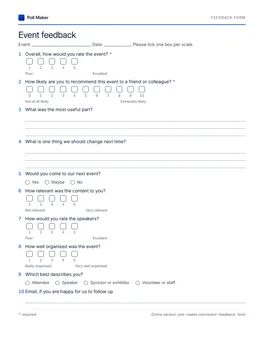
Printable event feedback form
All ten questions of the full form on one Letter page, with boxes to tick for every scale. Leave a stack by the door with a box for finished forms.
Download PDFHow to read the results
Three numbers and two piles of comments are enough to plan the next event.
| Question | What to calculate | What it tells you |
|---|---|---|
| Overall rating | The share of answers that are 4 or 5 | Whether the event worked, as one figure to track over time |
| Recommend (0 to 10) | Percent of 9 and 10, minus percent of 0 to 6 | Whether people would put their name to it |
| Come again | The share of Yes | How much of this audience you keep for the next one |
| Most useful and one change | Group the answers into themes and count each theme | What to keep and what to fix first |
A worked example
Forty people answer the recommend question. Twenty-two choose 9 or 10, twelve choose 7 or 8, and six choose 0 to 6. That is 55 percent promoters minus 15 percent detractors, a score of 40. The twelve in the middle count toward the total but not toward either side.
Compare the score with your own previous events rather than with other people's numbers. A score that rises from event to event matters more than any benchmark.
When there are hundreds of comments
Sorting open answers by hand works for a few dozen. For a conference, an event evaluation form creator that tags the themes and the mood of each comment for you is faster. PulseFormCreator, built by the team behind Poll Maker, also rates each part of the event separately, so a weak session does not drag down the venue.
Event feedback form questions
What questions should an event feedback form ask?
An overall rating, the 0 to 10 recommend question, what was most useful, one thing to change, and whether people would come again. That is the short version here. Add ratings for content, speakers and organisation when you need to know which part to fix.
How many questions is too many?
Keep it to what fits on a phone screen or two. In a web survey experiment, a longer stated length meant fewer people started and fewer finished.2 Five questions covers most events; ten is plenty for a conference.
When should I send the feedback form?
The same day. Show the QR code on the closing slide, then email the link within a few hours, while people still remember the details.
Should event feedback be anonymous?
This form asks for no name, and the email question is optional and says why it is there. Tell people that in the intro; they will be more candid when they know.
What is a good score on the recommend question?
Compare against your own past events first. The score runs from minus 100 to plus 100, and a rising score from one event to the next is the result that matters.
Do attendees need an account to give feedback?
No. They open the link or scan the QR code and answer. You only give an email address when you publish the form.
Can I print the event feedback form?
Yes. Download the one-page version above, which has the same ten questions with tick boxes for the scales.
Find out what to change before the next one
Five questions, sent the same day, tell you what worked, what to fix and who is coming back.