
185 Fun Poll Questions and Poll Ideas, All Multiple Choice
Poll ideas you can copy and run in a minute. Every question comes with answer options that are worth choosing between.
- 185 questions
- 15 categories
- Options for every one
- Copy and paste
Make a poll here, free. No account needed, and you get a link you can send anywhere.
Polling 1 million people every day since 2003

What makes a good multiple choice poll question
A poll is not a survey. There is one tap between reading it and voting, so almost everything that goes wrong goes wrong in the question itself. Five things separate a poll that fills up in ten minutes from one that sits at three votes.
- One decision per question. 'What should we order and what time should we eat' is two polls. People stall when they have to hold two answers in their head to give one.
- Three to five options. Two feels like a trick unless the question is deliberately binary. Six or more and the vote splits so thin that nothing wins, which is the one result a poll cannot really recover from.
- Cover the field. Write the options only after you have imagined four real people answering. If your own honest answer is missing, someone else's is missing too, and they scroll past instead of voting.
- Give people an out. 'Neither', 'Both', 'It depends' and 'I would rather not say' are not weak options. They are the difference between an honest result and a result from the enthusiastic half of the group.
- Keep the stakes low. Fun polls work because voting costs nothing. The moment a question could embarrass someone, or reads like a performance review with a joke on top, the response rate falls off a cliff.
Two smaller habits help. Keep the options roughly the same length, because a long option looks like the considered answer and quietly wins votes it has not earned. And read the question out loud before you post it. If you would not say it that way to the group in person, rewrite it.
Anonymity does more work than any wording trick. On Poll Maker votes are counted and not attributed, so nobody can open the results and see how one person voted. That is why 'did this meeting need to be a meeting' gets an honest answer in a poll and total silence in the room.
Poll of the day: daily poll questions
Low effort, high reply rate, and they work any day of the week. Post one at the same time each morning and it becomes a habit rather than an interruption. For a daily routine at work, there are 60 questions of the day for work.
What is the first thing you did after waking up today?
- Checked my phone in bed
- Got straight up
- Hit snooze at least once
- Went back to sleep for an hour
How is today going so far, honestly?
- Better than expected
- Fine, nothing to report
- Slightly cursed
- Ask me again at 5pm
What is powering you right now?
- Coffee
- Tea
- Water and willpower
- Sugar
- Nothing, and it shows
Pick the weather you would order for today.
- Bright and cold
- Warm and still
- Heavy rain, indoors
- Snow
- Whatever we have got
What is the one thing you are actually looking forward to today?
- A meal
- Seeing someone
- Finishing a task
- Going back to bed
- Genuinely nothing
How many browser tabs are open right now?
- Under 5
- 5 to 15
- 16 to 40
- So many the titles have disappeared
A reliable crowd pleaser. Everybody knows their number and everybody wants to compare.
What time did you actually go to sleep last night?
- Before 10pm
- 10pm to midnight
- Midnight to 2am
- I am still up
Which of these did you skip today?
- Breakfast
- A shower
- A meeting
- Going outside
- None, I am winning
Where are you answering this from?
- A desk
- The sofa
- Bed
- On the move
- Somewhere I should not be on my phone
If today had a difficulty setting, what would it be?
- Easy
- Normal
- Hard
- Nightmare
- No difficulty, just chaos
What is the last thing you paid for?
- Food or drink
- Getting somewhere
- Something for the house
- A subscription I forgot about
- Nothing yet today
Rate today out of five before it is over.
- 5, a good one
- 4
- 3, entirely average
- 2
- 1, write it off
Run this exact poll every week and the answers turn into a mood graph for the group.
12 questions in this set. Copy them all, or one at a time.
Funny poll questions and answers
The point is the answer options. A flat question with four funny options beats a clever question with four flat ones every single time.
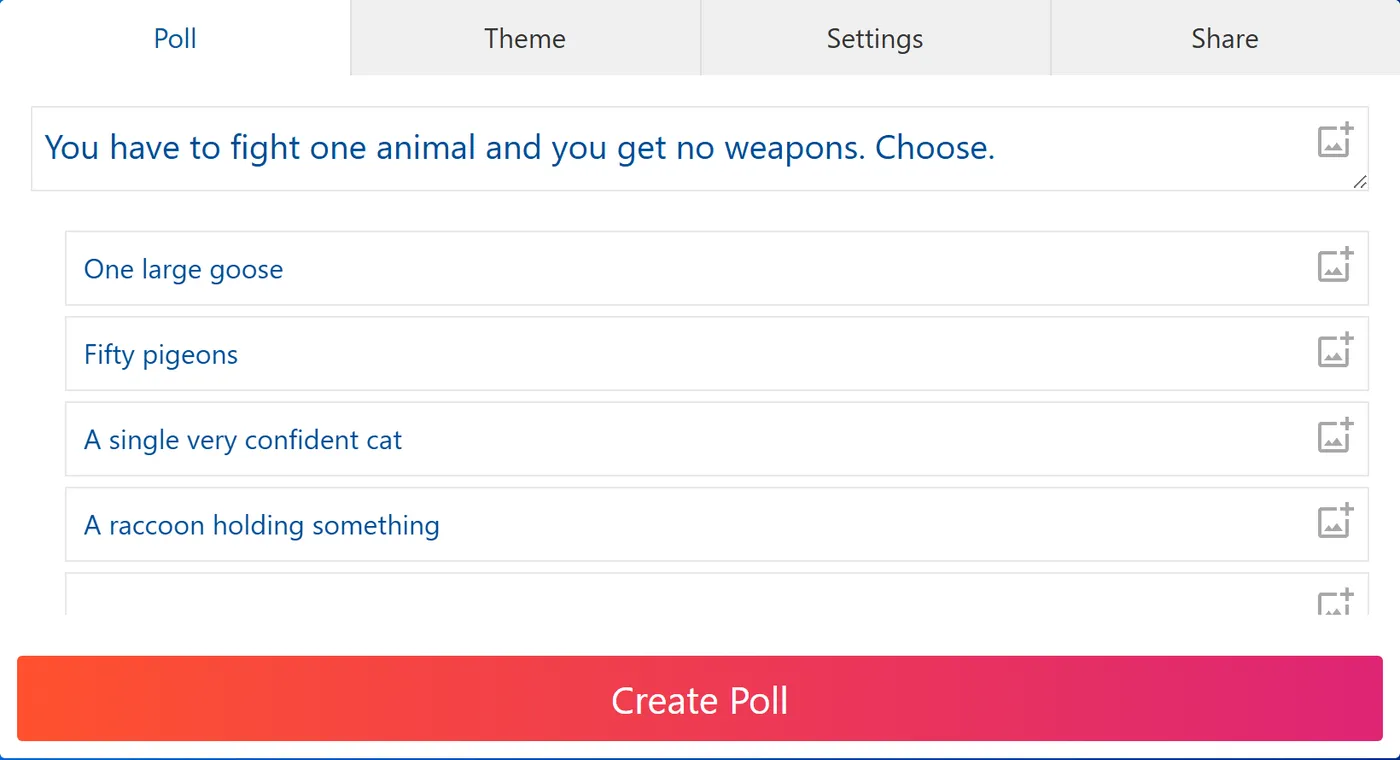
You have to fight one animal and you get no weapons. Choose.
- One large goose
- Fifty pigeons
- A single very confident cat
- A raccoon holding something
What is the most unhinged thing in your fridge right now?
- Something with no lid
- A condiment from a previous address
- Half an onion, unwrapped
- Nothing, it is empty
- I refuse to open it
Be honest, how do you eat a chocolate bar?
- Bite straight in
- Break it into squares
- Nibble the edges first
- Let it melt in my mouth
- In one piece, like an animal
A stranger says your name in public. What happens?
- I turn around instantly
- I pretend I did not hear
- I walk faster
- A full fight or flight response
What is your villain origin story?
- Someone microwaved fish
- A reply all chain
- Being told to smile
- Slow walkers in a narrow corridor
- I was simply born this way
How many days can a used mug sit on your desk before it is a problem?
- Zero, it goes back immediately
- One
- Three
- A mug does not become a problem
You are given a small crown. Where do you wear it?
- Everywhere, all the time
- Only at home
- Only to work
- Only to face my enemies
- I sell the crown
What noise do you make when you sit down?
- None, I am young
- A small exhale
- A full sigh
- An actual word
- Something inhuman
Pick the worst possible superpower.
- Talk to squirrels, only squirrels
- Teleport, but only three feet
- Always know when someone is lying
- Fly, but only backwards
- Be invisible, but only when nobody is looking
The elevator doors open and everyone inside is staring at you. Now what?
- Get in like nothing happened
- Say I forgot something
- Take the stairs forever
- Hold eye contact with one person
What would your reality show be called?
- Fine, Whatever
- Somebody Do Something
- The Snacks Are Gone
- Currently Buffering
- I Was Going To Do That
How would you do in a horror film?
- Gone in the first five minutes
- Survive by pure luck
- Die heroically saving someone
- I am the twist
- I would simply not go in the house
Your search history goes public in ten seconds. How bad is it?
- Completely fine
- Mildly embarrassing
- It needs context
- I would change my name and move
What is the correct number of pillows on a bed?
- One, like a normal person
- Two
- Four
- Six or more
- Enough to hide inside
Genuine argument fuel. Post it and do not intervene.
If you came with a warning label, what would it say?
- Do not speak to before 9am
- Contains strong opinions about food
- Fragile, handle with snacks
- May start a project and abandon it
- Batteries not included
15 questions in this set. Copy them all, or one at a time.
This or that questions
Binary by design. Two real answers and one honest way out, because 'neither' is a genuine position and forcing people past it just adds noise. There is a workplace set at this or that questions for work.
Cereal first or milk first?
- Cereal first
- Milk first
- I do not eat cereal and never have
Window seat or aisle seat?
- Window, and I am not moving
- Aisle, I need the exit
- Middle, I have given up on life
Reply straight away or reply in four days?
- Straight away, every time
- Days later, with an apology
- Entirely depends who it is
Early bird or night owl?
- Up before six and genuinely happy
- Only alive after 10pm
- Neither, I am tired at all hours
Pineapple on pizza?
- Yes, and it is correct
- No, and it is a crime
- I will eat it but I will not order it
Everyone decided years ago. Post this when you want comments, not information.
Sweet breakfast or savory breakfast?
- Sweet
- Savory
- Whatever is closest to my hand
The book or the film version?
- The book, always
- The film, I have no time
- The book, but I only watched the film
Do you make the bed?
- Every single morning
- Only when someone is coming over
- Never, it gets unmade anyway
Phone call or voice note?
- Call, get it over with
- Voice note, on my own terms
- Neither, please just type it
Silence or something always playing?
- Silence
- Something always on
- Silence at work, noise at home
On vacation: phone off or phone on?
- Off completely, do not contact me
- On, I like knowing what is happening
- Off for one day, then I crack
Toilet paper: over or under?
- Over
- Under
- I have genuinely never looked
Do you eat the crusts?
- Yes, it is bread
- No, and I feel no guilt
- Only if somebody is watching
13 questions in this set. Copy them all, or one at a time.
Would you rather questions
Some of these are the classic two horned version and some are a four way pick your poison, which tends to get more votes because nobody has to commit to a whole hypothetical. More at would you rather questions.
Would you rather have unlimited money or unlimited time?
- Unlimited money
- Unlimited time
- Both would ruin me equally
Would you rather always be 20 minutes early or always 10 minutes late?
- Always early
- Always late
- I already do one of these and cannot stop
Which would you actually give up for a year?
- All streaming
- All takeout food
- All social media
- My morning coffee
Rewriting a would you rather as a four way choice usually lifts the vote count. Everyone finds something they can honestly pick.
Would you rather know exactly when you will die, or exactly how?
- When
- How
- Neither, keep it away from me
Would you rather work four long days or five short ones?
- Four ten hour days
- Five six hour days
- Five short days and no meetings
Works as a fun poll and as a real one. Expect it to be shared outside the team.
Would you rather fly at walking speed or run at 60mph?
- Fly slowly
- Run very fast
- Whichever one avoids public transport
Would you rather lose all your photos or all your messages?
- Photos
- Messages
- I would genuinely need to think about this
Which superpower would you actually use every day?
- Never need sleep
- Instant travel anywhere
- Perfect memory
- Speak every language
Would you rather be famous for something silly or respected by twelve people?
- Famous and silly
- Respected by twelve
- Neither, leave me out of it
Pause button or rewind button?
- Pause
- Rewind
- Fast forward, get me through this
Which would you survive longest without?
- Hot water
- Wifi
- A comfortable bed
- Anything sweet
Would you rather your search history went public or your camera roll?
- Search history
- Camera roll
- I would delete both and start again
Would you rather never wait for anything again, or never be interrupted again?
- Never wait
- Never be interrupted
- Never be interrupted, and it is not close
13 questions in this set. Copy them all, or one at a time.
Icebreakers for a new group
For a room, a course or a channel where people do not know each other yet. Every one of these has a true answer for everybody, which is the only rule that matters in the first five minutes.
How did you get here today?
- Walked
- Drove
- Public transport
- Cycled
- I have not moved, I am at home
The safest possible opener for a room that has never met. It has a right answer for everyone.
How far away do you live from this room?
- Under 10 minutes
- 10 to 30 minutes
- 30 to 60 minutes
- Over an hour
- A different country
How do you feel about introducing yourself to a group?
- Love it
- Fine once I start
- Dreading my turn
- I would rather leave
Naming the awkwardness out loud defuses it faster than any activity does.
What are you hoping to get out of today?
- Something practical I can use
- Meeting people
- A clear answer to one question
- Honestly, I was told to come
Pick the one that is true about you.
- I have lived in three or more places
- I can play an instrument
- I have run a race
- I have been on TV
- None of these, I am a mystery
How do you take a break?
- Outside, always
- Scrolling
- With other people
- I do not take breaks
- Whatever is going
What is your name situation?
- People get it right first time
- It gets mispronounced constantly
- I go by a shorter version
- I go by something unrelated
Small, but it saves a week of people quietly getting names wrong.
In a new group, you are usually the one who...
- Talks first
- Waits and watches
- Asks the questions
- Makes the joke
- Says nothing and remembers everything
How long have you been doing what you do?
- Under a year
- One to three years
- Three to ten years
- Over ten years
- I am not sure what I do
What is your energy level right now?
- Ready
- Warming up
- Running on caffeine
- Present in body only
What would make today useful for you?
- Fewer slides
- More time to talk
- A clear next step
- Finishing early
Which of these have you never done?
- Been on a plane
- Eaten sushi
- Driven a car
- Broken a bone
- I have done all of these
12 questions in this set. Copy them all, or one at a time.
Work: team check-ins and morale
Light enough to answer in a tap, useful enough to act on. If you want the longer and more direct version, see employee engagement poll questions.
How is your workload this week?
- Light, I have room
- About right
- Full but manageable
- Too much
- I do not know what I am supposed to be doing
The last option catches the problem the other four hide. Leave it in.
What is the single biggest thing slowing you down right now?
- Waiting on someone else
- Too many meetings
- Unclear priorities
- Tools and systems
- Nothing, I am fine
How did last week go for you?
- Great week
- Solid
- Mixed
- Rough
- Please do not ask
Do you have what you need to do your job well?
- Yes
- Mostly
- Missing one important thing
- No
When did you last get feedback you could actually use?
- This week
- This month
- Cannot remember
- I have never had any
If the answers skew late, follow up with feedback questions.
How do you like to be recognized for good work?
- Said publicly
- Said privately
- In writing
- Not at all, please
- Money
What would make next week better?
- Fewer meetings
- Clearer priorities
- More time on one thing
- Help from someone
- A day off
How connected do you feel to the rest of the team?
- Very
- Fine
- I only really know a few people
- Not at all
Is the current pace sustainable for you?
- Yes, indefinitely
- For a few more weeks
- For a few more days
- No, it already is not
How often do you finish the day feeling the important thing got done?
- Most days
- Some days
- Rarely
- I could not tell you what the important thing is
What kind of week are you heading into?
- Heads down
- Lots of meetings
- Firefighting
- Wrapping things up
- Genuinely unsure
Useful on the Monday before you ask anybody for a favor.
If we changed one thing about how we work, what should it be?
- Fewer status meetings
- Clearer ownership
- Better handovers
- More written, less live
- Nothing, it works
12 questions in this set. Copy them all, or one at a time.
Work: meetings and agenda
Ask these in the meeting, in the last minute, while everybody is still in the room. Related: presentation feedback questions and town hall feedback questions. For polls that drive a decision, see poll questions for meetings.
Did this meeting need to be a meeting?
- Yes, definitely
- Yes, but shorter
- No, an email would have done
- No, and I said so at the time
Only ask this if you are willing to act on the answer. Asking and then ignoring it is worse than never asking.
How long should our weekly meeting actually be?
- 15 minutes
- 30 minutes
- 45 minutes
- An hour
- It should not exist
What is the best time of day for this meeting?
- First thing
- Late morning
- Straight after lunch
- Late afternoon
- Any time that is not Monday
How should we run the next one?
- Same as today
- Agenda sent in advance
- Shorter, standing only
- In writing instead
- Half of us do not need to be there
Did you get to say what you wanted to say today?
- Yes
- Mostly
- No, we ran out of time
- No, I could not get a word in
Which agenda item should we cut?
- Status updates
- The numbers review
- Open floor
- Announcements
- Nothing, keep it all
Where should the notes live?
- In the calendar invite
- In the team channel
- In the shared doc
- Emailed round
- Anywhere, as long as it is one place
How much of that meeting was relevant to you?
- All of it
- Most of it
- About half
- A few minutes
- None, I was there just in case
What should we do with the last five minutes?
- Confirm the actions
- Open questions
- Finish early
- One thing that is not work
- Overrun, as usual
Cameras on for this one?
- On, always
- On for the first five minutes
- Off unless speaking
- Off, entirely optional
How clear are you on what happens next?
- Very clear, I know my part
- Clear on the plan, not on my part
- Vague
- Not clear at all
The most useful poll you can run in the final minute of any meeting.
Should this meeting stay on the calendar next month?
- Keep it as is
- Keep it but halve the length
- Move it to every two weeks
- Cancel it
12 questions in this set. Copy them all, or one at a time.
Remote and hybrid teams
Half of these are fun and half quietly surface the things distributed teams never say out loud.
How many days a week are you in the office?
- Five
- Three or four
- One or two
- None
- Whenever I feel like it
What actually makes you come in?
- Seeing people
- A quiet desk
- Meetings that need a room
- Free food
- Being told to
What is the hardest part of working from home?
- Not switching off
- Feeling out of the loop
- Distractions
- The setup itself
- Nothing, it is better
How is your home setup?
- Proper desk and chair
- Desk, questionable chair
- Kitchen table
- Sofa
- I am in bed and I am not sorry
What is behind you on video calls?
- A real wall
- A tidy shelf
- A virtual background
- Chaos I have stopped hiding
- Camera off
How do you signal that you are heads down?
- Status message
- Calendar block
- Headphones on
- I do not, people just guess
When somebody is offline, what do you assume?
- They are focused
- They are in a meeting
- They are on a break
- I do not think about it
- Something suspicious
How quickly do you expect a reply in the team channel?
- Within minutes
- Within an hour
- Same day
- Whenever, it is not urgent
Mismatched expectations here cause most of the friction in remote teams. Worth seeing the spread.
What do you miss about being in a room together?
- Overhearing things
- Quick questions
- Lunch
- Whiteboards
- Genuinely nothing
How often should the whole team be in the same place?
- Weekly
- Monthly
- Every few months
- Once a year
- Never, it is fine as it is
Your old commute time now goes to...
- More sleep
- Exercise
- Family
- Starting work earlier
- It vanished and I cannot account for it
How do you feel about the current hybrid setup?
- Works well
- Works, with fixes
- Not working
- We do not really have one
12 questions in this set. Copy them all, or one at a time.
Food and drink
The most reliable poll topic there is. Everybody has an opinion, nobody is offended, and the arguments are free.
What is the correct lunch?
- A proper sit down meal
- A sandwich at the desk
- Leftovers
- Something I bought on the way
- I skip lunch
Best late night food?
- Pizza
- Fries
- Toast
- Instant noodles
- Cereal, straight from the box
How do you feel about olives?
- Love them
- They are fine
- Cannot stand them
- Only in certain things
Reliably splits a room down the middle, and nobody is ever persuaded.
The one food you would never turn down?
- Cheese
- Bread
- Chocolate
- Chips
- Fruit, I am fine thank you
How spicy do you actually like it?
- No spice at all
- Mild
- Medium
- Hot
- Hot enough to regret it
What is in your fridge that should not be?
- Something past its date
- A takeout box from last week
- Batteries
- Nail polish
- Nothing, it is immaculate
Best chip flavor?
- Plain salted
- Salt and vinegar
- Barbecue
- Sour cream and onion
- Something with a chili on the bag
How do you take your toast?
- Barely warmed
- Golden
- Well done
- Actually burnt
- Burnt, then scraped
What is the group ordering tonight?
- Pizza
- Curry
- Burgers
- Noodles
- Something one person will complain about
The classic group chat poll. Put a closing time in the message or it will still be open at 9pm.
Fizzy drink of choice?
- Cola
- Lemonade
- Something orange
- Sparkling water
- I do not drink them
How many coffees a day is too many?
- One is plenty
- Two
- Three
- Four
- There is no upper limit
Which do you always regret ordering?
- The salad
- The shared platter
- The dessert
- The extra side
- Nothing, I have no regrets
12 questions in this set. Copy them all, or one at a time.
Classroom and students
An anonymous poll gets you a truer read of a room than a show of hands ever will. For structured course feedback, see training feedback poll questions. For every part of a lesson, see poll questions for students.
How do you learn something new best?
- Reading it
- Being shown
- Trying it and failing
- Explaining it to someone else
- A video at 1.5x speed
How confident are you with today's topic?
- I could teach it
- Comfortable
- Getting there
- Lost about halfway
- Lost from the start
Anonymous, this gets you the truth. A show of hands never does.
When do you do your best work?
- Early morning
- Middle of the day
- Evening
- Late at night
- Two hours before the deadline
How did you prepare for today?
- Did all the reading
- Skimmed it
- Meant to
- Did not know there was any
- I am here by accident
What would help most right now?
- A worked example
- More practice questions
- A quick recap
- A break
- Moving on faster
How do you take notes?
- Handwritten
- Laptop
- Photos of the slides
- I do not, I just listen
- I will get them off someone
How should we run the group project?
- We pick our own groups
- Random groups
- Work alone
- Pairs
- Anything except a group project
What is your study method?
- Flashcards
- Practice tests
- Rewriting notes
- Explaining it out loud
- Panic
How long can you concentrate before you need a break?
- 20 minutes
- 40 minutes
- An hour
- Two hours
- You lost me at concentrate
Which deadline setup do you actually prefer?
- One big deadline
- Weekly checkpoints
- Flexible, whenever it is done
- It makes no difference, I will be late
How useful was that session?
- Very, I got what I needed
- Useful in parts
- Too fast
- Too slow
- Not useful
Ask in the last minute while people are still in the room. Response rates collapse the moment they leave.
What should the next session cover?
- More on today's topic
- The thing everyone is stuck on
- Something practical
- Exam technique
- Surprise us
12 questions in this set. Copy them all, or one at a time.
Fun polls for friends and social groups
For the group chat that has been trying to arrange something since March. For quick two-button polls, try yes or no poll questions.
How do we decide where to go?
- Someone just picks
- Vote on three options
- Whoever shouts loudest
- We do not, and that is why we never go
How late is acceptably late?
- Not late, on time
- 5 minutes
- 15 minutes
- 30 minutes
- Whenever, we all know who it is
What should we do this weekend?
- A proper night out
- Dinner somewhere
- Someone's house
- Something outdoors
- Cancel and stay in
How do you feel when plans get cancelled?
- Genuinely disappointed
- Slight relief
- Enormous relief
- Depends entirely who cancelled
Who is booking this?
- I will do it
- The same person as always
- Nobody, and that is the problem
- Let us just turn up
How do we split the bill?
- Straight down the middle
- Everyone pays for their own
- One person pays, we settle later
- Whoever suggested it pays
Far better to poll this before the meal than argue about it after.
What time should we meet?
- Early, make a day of it
- Afternoon
- Early evening
- Late
- Whenever, I have no plans
What ruins a night out fastest?
- A long line
- Somebody being difficult
- Bad music
- The prices
- Having work in the morning
How often should this group actually meet?
- Weekly
- Monthly
- Every few months
- Once a year is realistic
- More than we currently do
Group trip: what is the plan?
- Somewhere hot, do nothing
- A city, walk everywhere
- Outdoors and hiking
- One house, cook every night
- I am not coming and you know it
Be honest about the group chat.
- I read everything
- I skim it
- I mute it and check later
- Muted permanently
- What group chat
What is the honest reason we have not met up?
- Everyone is busy
- Nobody organizes it
- We live too far apart
- We are all pretending we will
An anonymous poll is how a group says the awkward thing without anybody having to own it.
12 questions in this set. Copy them all, or one at a time.
Party and events
Settle the arguments before the day rather than during it. Sending invitations? The RSVP form collects every reply and the headcount in one place.
What time does this actually start?
- The time on the invite
- Half an hour after
- An hour after
- When the first person arrives
What are you bringing?
- Drinks
- Food
- Dessert
- Something I bought on the way
- Myself, and that is a gift
Music: who is in charge?
- One person, one playlist
- Shared playlist, anyone can add
- Whatever happens to be on
- Absolutely nobody gets the aux
Poll this before the party. Nobody in history has resolved the aux question calmly in the moment.
Where do you spend most of a party?
- The kitchen
- On the sofa
- Near the food
- Outside
- Talking to the dog
Theme or no theme?
- Full theme, fully committed
- Light theme, one hat
- No theme
- A theme, which I will forget
What is the correct end time?
- 10pm, civilized
- Midnight
- 2am
- When the food runs out
- There is no correct end time
How do you feel about party games?
- Bring them on
- One is fine
- Only if there is a prize
- Absolutely not
Best party food?
- A proper spread
- Pizza
- Chips and dips
- Something somebody actually cooked
- Cake, only cake
What is the invite situation?
- Everyone can bring someone
- Just the list
- Small and close
- Open door, see what happens
Speeches: yes or no?
- Yes, one short one
- Yes, and let them run
- One only, and it is timed
- No speeches under any circumstances
What is the best part of an event?
- The first hour
- The middle
- The last hour
- The bit afterwards in the taxi
- The moment I decide to leave
Secret Santa: what is the budget?
- Under 10
- 10 to 25
- 25 to 50
- Over 50
- Let us skip it this year
Poll the budget before you poll whether to do it. The budget is the part people actually disagree about.
12 questions in this set. Copy them all, or one at a time.
Pop culture, film and music
Safe territory for a mixed group, because nobody's job depends on the answer.
How do you watch a new series?
- All in one sitting
- Two or three a night
- One a week, like an adult
- Start it and never finish it
Subtitles on or off?
- Always on
- Only for accents
- Off
- On, and I still miss things
What do you rewatch when nothing else appeals?
- A sitcom
- A crime drama
- A film I know by heart
- A cooking show
- Nothing, I scroll for 40 minutes and give up
The last option is the honest one and it usually wins. Leave it in.
What is your listening setup?
- One playlist on repeat
- Whatever the algorithm gives me
- Full albums, in order
- Podcasts only
- Silence
Movie theater or home?
- Theater, big screen
- Home, my own snacks
- Home, so I can pause
- Theater for some films only
Which genre do you actually pick?
- Comedy
- Thriller
- Something animated
- Horror
- A documentary I will fall asleep in
The soundtrack of your teenage years was...
- Guitars
- Pop
- Hip hop
- Dance
- Something I will not admit to
Do you finish a book you are not enjoying?
- Always finish
- Give it 100 pages
- Abandon it immediately
- I have four unfinished on the go
Live music: what is your position?
- Down the front
- Middle of the crowd
- At the back near the exit
- Seated only
- I would rather listen at home
Which sequel should never have been made?
- The superhero one
- The comedy one
- The one nobody asked for
- The good one, actually
- All sequels, on principle
Your karaoke song is...
- A power ballad
- Something everyone can join in with
- A rap I cannot keep up with
- A duet, and you are doing it with me
- I do not sing, ever
How do you pick what to watch?
- A review
- Someone recommended it
- The thumbnail
- Whatever is top of the app
- I put on something I have already seen
12 questions in this set. Copy them all, or one at a time.
Seasonal and holidays
Time these to the week they matter. A Christmas poll in March gets nothing.
When is it acceptable to start Christmas?
- November 1
- December 1
- Mid December
- Christmas Eve
- Never, I am opting out
Post it in November and watch the group chat go up in flames.
Best thing about summer?
- Light evenings
- Being outside
- Time off
- Cold drinks
- Nothing, I am too hot
How do you feel about the clocks changing?
- Love the extra hour
- Hate the dark evenings
- I genuinely do not notice
- Just pick one and stop
New Year plans?
- A big night out
- A small gathering
- Quiet at home
- Asleep before midnight
- Working
Do you make resolutions?
- Yes, and I keep them
- Yes, and I do not
- One small realistic one
- No, never
Best season, no arguing.
- Spring
- Summer
- Fall
- Winter
Halloween: what is your level?
- Full costume, planned weeks ahead
- Something thrown together
- A single accessory
- Lights off, pretending I am out
How early do you start holiday shopping?
- Months ahead
- A few weeks
- The week before
- The day before
- I buy gift cards and feel nothing
What is the best day off in the year?
- A long weekend in spring
- Midsummer
- The gap between Christmas and New Year
- Any random Wednesday
How do you feel about the office holiday party?
- Genuinely looking forward to it
- I will go for an hour
- I will go if other people do
- I would rather have the budget in cash
The last option is not a joke and it often wins. Be ready for that.
Winter: what gets you through it?
- Being outside anyway
- Hot food
- A trip somewhere brighter
- Hibernating
- Sheer force of will
What is the correct response to a heatwave?
- Indoors, curtains shut
- Get to water
- Carry on as normal
- Complain constantly
- Move to a colder country
12 questions in this set. Copy them all, or one at a time.
Where to run these poll ideas
The same question performs very differently depending on where it lands. Honest guidance, one line each.
Group chat
The best hit rate anywhere, because everyone in the thread already reads it. Keep it to four options; the native poll layout gets cramped past that. WhatsApp and iMessage polls take up to 12 options; a link poll only matters when you need more than that or want the vote anonymous.
Good for: friends, family, plans
Slack or Teams
Post it in the channel rather than a DM, and say when you will close it. A poll with no deadline stays open forever and the result never gets used. Teams polls take up to 12 options; Slack has no built-in poll, so paste a link.
Good for: check-ins, lunch, meeting formats
Instagram or TikTok story
Four options at most, and it disappears in a day, so ask something people can answer in half a second while half watching.
Good for: this or that, would you rather
LinkedIn or X
Public polls are content. The interesting part is the comment thread, so pick something people want to disagree with. X polls take four options and run for up to seven days; LinkedIn polls also stop at four, so trim the list or link out to a fuller poll.
Good for: opinion splits, mild controversy
Live in a meeting or class
Share a link or a code and read the options out loud. Anything people have to squint at on a projector loses half the room.
Good for: energizers, quick votes, teaching
Embedded on a page
Put the poll where the question already came up, not on a separate page you have to link to. Embedding is a Pro feature.
Good for: blog posts, intranet, event pages
Whichever one you pick, the mechanics are the same: one question, three to five options, a stated closing time, and the result posted back to the same place. If you have not built one before, how to make a poll walks through the settings that matter.
Common questions
What are some good poll questions?
A good poll question asks one thing, offers three to five options that cover the realistic answers, and is about something the group actually has an opinion on. Every question on this page follows that shape, and the copy button on each one gives you the question and its options together.
If you want a quick pick, start with the poll of the day set at the top. Those are built to get an answer in under ten seconds.
What are some fun questions to ask friends in a poll?
The funny and ridiculous set and the friends set are written for exactly this: which animal would you fight, what is the most unhinged thing in your fridge, who in the group is most likely to get lost in their own town. The answer options are where the fun is, so keep them.
In a group chat, four options is the sweet spot. It is enough to argue about and few enough that people vote instead of scrolling.
What is a fun question to ask your coworkers?
Pick from the team check-in set or the meetings set. The safe ground is low stakes and shared: the office coffee, the best day for the offsite, the worst reply-all you have seen. Avoid anything about pay, performance or a named colleague.
Post it where people already are, say when you will close it, and share the result afterwards. A poll with no result posted trains people not to bother next time.
How many answer options should a poll have?
Three to five for most questions. Two works when the question is genuinely binary, like a this or that, but with only two options a lot of people who fit neither simply do not vote. Past five or six the votes spread so thin that nothing wins, and a poll with no winner is hard to do anything with.
The exception is when you want a long tail of answers rather than a decision. If you are gathering ideas rather than picking one, a form is the better tool. See Form Builder.
Should polls be anonymous?
For anything opinion shaped, yes. On Poll Maker votes are counted and not attributed, so nobody can open the results and see how a particular person voted. That is what makes a question like 'did this meeting need to be a meeting' safe to ask at all.
The exception is a logistics poll where you need to know who is coming, because you cannot act on it without the names. Use a form or a scheduling poll for those.
How long should I leave a poll open?
For a group chat or a work channel, a day is usually plenty and most of the votes land in the first hour. For a public audience poll, 24 hours matches how most feeds work. For anything you are using to decide something, put the closing time in the message, because a poll with no deadline never really closes and the result never gets used.
You can also set start and end dates in advanced settings so the poll closes itself.
How often should I post a poll?
Once a week keeps a channel or an audience interested. Every day works only if the poll is genuinely quick and light, which is what the poll of the day questions above are for. The fastest way to kill the format is to ask something that feels like work three days running.
Watch the vote count rather than the calendar. If it drops on two polls in a row you are either asking too often or asking the wrong things.
What do I do about a tie?
Decide the tiebreak before you post, not after. The two honest options are to run a second poll with only the tied answers in it, or to say up front that you will pick if it is close. Both are fine. What irritates people is discovering the poll was advisory only after they see the result.
If ties keep happening your options are too similar. Merge the two that mean nearly the same thing.
Should I let people add their own option?
Only when you genuinely do not know the field. Ticking Other to add answer lets voters write in something you did not think of, which is useful for a first poll on a new topic and messy for a decision, because the write ins split the vote and the winner ends up with a small share.
A good middle ground is to run one open poll to see what people say, then a clean three to five option poll to decide.
Do fun polls at work actually land, or do people find them annoying?
They land when they are short, optional and clearly not a test. They stop landing when they arrive at the same time as bad news, when they are the only way anybody is being asked anything, or when the answers visibly go nowhere.
If morale is the real question, a fun poll is a poor instrument for it. Ask directly instead. See employee engagement poll questions.
Can I use these in Slack, Teams, Instagram or a group chat?
Yes, they are written to be pasted anywhere. Native polls in each app have their own limits, mostly on how many options fit and how long the poll lives, so trim to two options for a story poll and about four for a chat.
If you want one link that works everywhere and keeps all the results in one place, make the poll once and share the link. Posting into Slack, website embedding, email sending and unique voting codes are Pro features.
Should I allow more than one answer?
Use choose one when you want a decision, and choose any that apply when you want a picture. Selecting multiple answers turns a poll from 'choose one' into 'choose any that apply', which is right for 'which of these would you come to' and wrong for 'where should we go'.
Multi answer results are harder to read because the shares no longer add up to a hundred. Switch the display to counts when you use it.
Why did my poll get no votes?
Almost always one of four things: the question needed thinking about, the options did not contain the reader's real answer, it was posted somewhere people were not already looking, or there was no reason to answer now rather than later. Fix the options first, they are the most common cause by a distance.
The other quiet killer is length. If the question does not fit on one line on a phone, rewrite it shorter.
Do I have to share the results?
Share them unless you have a reason not to. People vote next time if they saw what happened last time. One line back in the channel is enough: the winner, its share, and what you are doing about it.
If the result is not going to change anything, say that too. Nobody minds a poll being purely for fun. They mind being asked and then ignored.
Is a poll or a survey the right tool for this?
A poll is one question, seen by everyone, answered in a tap. A survey is several questions that somebody sits down for. If you catch yourself writing a second question, you want a survey.
There is a much larger bank of longer form questions at survey questions.
Related guides
Ready to ask?
One question, a handful of answers, a link you can paste anywhere. No account, no limits on votes.
Make a free poll
Social media and audience polls
Public polls are content, not research. Pick questions people want to argue with in the comments. Platform specific ideas at LinkedIn poll ideas and Instagram poll questions.
What should I post more of?
Be honest, how did you find this account?
What time do you actually see posts?
Which of these would you actually read?
Works on any platform, and the answer changes what you make next week. That is the whole point of an audience poll.
Do you unfollow, mute, or just scroll past?
What is your relationship with notifications?
How many times have you opened this app today?
What makes you stop scrolling?
Where do you actually want to hear from us?
Hot take: are the comments better than the post?
What do you do with a post you like?
One long post a week or five short ones?
12 questions in this set. Copy them all, or one at a time.