A free Mentimeter alternative without the 50-participant limit
Mentimeter's free plan covers 50 participants a month. After that you can't present again until the counter resets or you pay. Poll Maker Presentations has no audience cap and no sign-up, and it's free.
Opens the editor. No account, no card.

Fifty people a month goes fast
Mentimeter counts participants across everything you present in a month. Its help page gives the example itself: if the first presentation you hold has 60 participants, you have now hit your 50 participants limit.
Nobody gets thrown out, and you can keep that one presentation going for eight hours. After that you wait for the counter to reset, on the day of the month you opened your account, or you upgrade. So put a few town hall questions to 60 colleagues on the 3rd, and Thursday's workshop has no poll.
50participants a month on Mentimeter Free
No capon Poll Maker, free
On 3 October 2026 we load-tested one room with 50,000 simulated phones, on a staging copy of the service with multiple choice questions. Every phone joined and every vote was counted.
Mentimeter Free and Poll Maker, row by row
What we do better is at the top. The three rows at the bottom are not wins for us, and you should see those too.
| Compared | MentimeterFree plan | Poll Maker PresentationsFree |
|---|---|---|
| Audience size | 50 participants a month, counted across everything you present. Pass it and you wait for the monthly reset, or pay. | No cap hereNo cap. Sixty people or six thousand, it is the same free tool. |
| Account to present | A free account, before you can build anything | No sign-upNone. The editor opens when you click. |
| Download your results | Needs a paid plan: Excel and PDF from Basic up | Free hereCSV, Excel, PDF, PowerPoint and PNG |
| Your logo and brand colours | Pro, Conference or Enterprise | Free hereYour logo, your colour, 16 themes and 13 fonts |
| Phone remote for the presenter | Mentimote, on Pro and Enterprise | Free hereA private link you open on your phone. No sign-in. |
| Approve audience questions first | Pro, Conference or Enterprise | Free hereQuestions and written answers wait for your OK, and common swear words are masked |
| How the audience joins | QR code, or an 8-digit code at menti.com. No app, no account. | Shorter codeQR code, or 6 digits at poll-maker.com/join. No app, no account. |
| A link people can answer any time | Survey mode, a setting you switch to, on every plan. Menti Form and Menti Pulse answers do not count towards the 50. | Nothing to switchEvery poll has a link and a live code from the start, feeding one set of results |
| Branding on the free plan | The Mentimeter logo, until a paid logo replaces it | A small Made with Poll Maker link |
| Question types | 23 slide types on the Free plan | Seven: multiple choice, image choice, word cloud, open text, rating scale, ranking and audience Q&A. Up to 40 questions a poll. |
| PowerPoint, Zoom and Teams | A PowerPoint add-in for the desktop app, and apps for Zoom and Microsoft Teams, on every plan | No add-in. Put our join slide in your deck, or share the browser tab on a call. |
Mentimeter's plans and limits as published on 5 October 2026. Each Mentimeter cell links to the page it comes from.
The editor is one click away, and it doesn't ask who you are.
What you notice the first time you run it
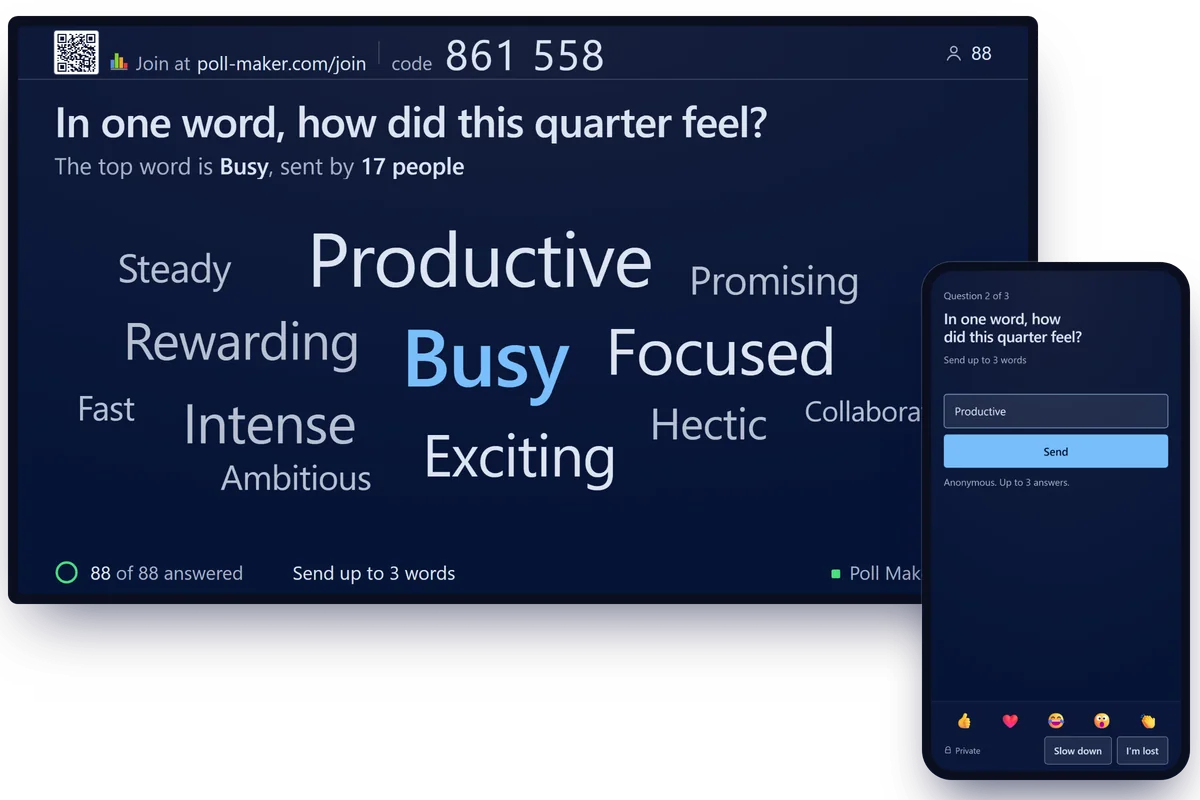
The word cloud grows while people are still typing
Each person can send up to three words. Popular ones get bigger, simple plurals are counted together, and common swear words are masked before they reach the screen. It makes a good opener, and we keep a list of icebreaker questions for work if you need one.
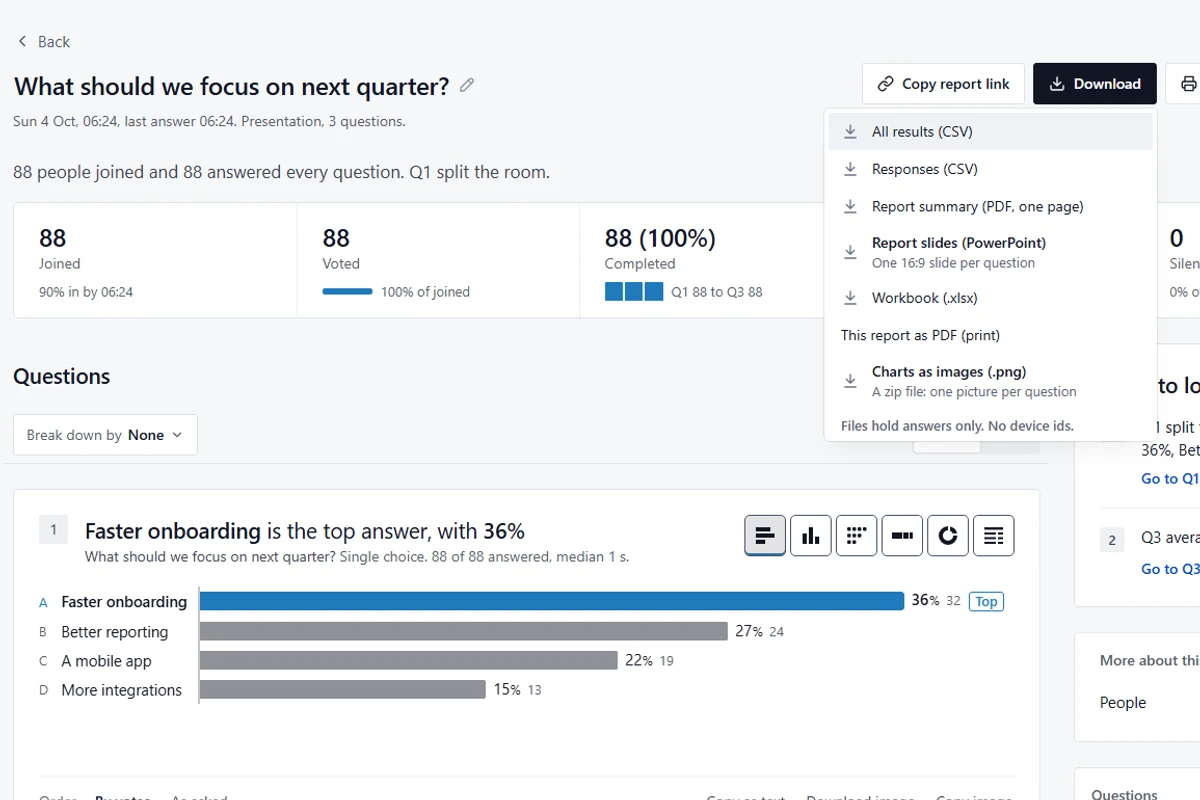
Every download sits in one menu, and none of them is paid
On 4 October 2026 we made this poll on our test build without an account and downloaded all five formats. The PowerPoint file has one slide per question, so the answers to your training feedback questions can go straight into the follow-up deck.
Two private buttons on every phone
Slow down and I'm lost. Only you see the count, and a tap fades after 90 seconds, so it shows how the room feels now.
Press Z for the back row
Large text makes the big screen and every phone one size bigger. For a weak projector there's a High contrast theme.
Latecomers get in on their own
The QR code and the six digits stay on top of every question. You don't go back a slide for the person who walked in late.
Voters see the room's answer too
After voting, each phone shows how the room voted, and people can change their answer until you close voting.
What the same list costs at Mentimeter
Five rows from the table above. Each is free on Poll Maker. At Mentimeter each needs a paid plan, and the paid plans are sold by the year.
€168Basic for a year: 12 x €14, before tax€336Pro for a year: 12 x €28, before taxFreePoll Maker
What Mentimeter's plans page showed us on 5 October 2026: €14 for Basic and €28 for Pro, per presenter a month, billed yearly, in euros and before tax. Mentimeter sets prices by country, so check what it shows you. For one event there is a Conference plan, from €350 for one month.
Can I pay for one month? No. For Mentimeter Pro and Basic, we only offer yearly subscriptions.
- More than 50 participants a monthBasic planFree
- Download your resultsBasic planFree
- Your own logo and coloursPro planFree
- A phone remotePro planFree
- Approve Q&A questions firstPro planFree
Mentimeter renews yearly plans automatically and does not refund a renewal. It says it sends a reminder first.
Poll Maker has a paid plan too. It hides the small Made with Poll Maker link, shares a poll library with your team and keeps votes for two years. Nothing above needs it, and our plans page has the prices.
What people dislike about Mentimeter, in their own reviews
Mentimeter is well rated overall: 4.4 out of 5 on Capterra UK (101 reviews) and 3.9 out of 5 on Trustpilot (62 reviews), checked on 5 October 2026. Most people who review it like it. Six complaints keep coming back all the same, mostly inside good reviews, and we checked each one against Mentimeter's own pages.
Based on 347 public reviews read on 5 October 2026: 100 on Capterra UK, 47 on Trustpilot and 200 G2 reviews as republished on Microsoft Marketplace. One review can raise several points, and we print quotes from Trustpilot and Capterra UK only.
The free plan runs out at 50 people a month
74 of 347 reviews complain about free-plan limits or features kept for paid plans. 11 name the 50 cap.
A lot of full features are locked behind a subscription fee and there are limited customization options.
Mentimeter's plans page confirms the 50. To be fair to it, one presentation a month may go over and nobody is removed part-way through.
You can't pay for a single month
10 of 347 reviews.
Product is fine and doing its job. Terrible pricing model. Seems like no way to subscribe by month.
Mentimeter's plans page says so in its own FAQ, and it does print "Billed yearly" beside the monthly figure.
Plans renew by themselves, and a renewal isn't refunded
11 of 347 reviews, 10 of them one or two stars.
Therefore, automatic subscription renewals are not eligible to be refunded.
That sentence is from Mentimeter's refund page, and its renewal page says subscriptions renew automatically. Mentimeter says it sends a reminder before a yearly plan renews. 7 of the 17 low-star English Trustpilot reviews read on 5 October 2026 describe a refused refund or an unexpected renewal.
Downloading your results needs a paid plan
21 of 347 reviews.
Exporting session results to Excel requires a paid Mentimeter plan.
From Mentimeter's help page on exports. On its plans page, exports start at Basic.
The PowerPoint add-in only runs in the desktop app
54 of 347 reviews mention trouble with PowerPoint, Teams or importing slides.
A bit hit and miss in integrating into ppt. Sometimes had to exit ppt and present from web browser
Mentimeter's add-in page confirms it: desktop PowerPoint only, and its keyboard shortcuts don't work inside the add-in. The add-in does come with every plan, and we have no add-in at all, so this one is no win for us.
You get little say over the design
53 of 347 reviews.
I wish there was more customization available - even on the pro package you are limited by the layouts you can choose and where images can be placed on the slides
Mentimeter's font page says picking a font style needs Pro and that you can't use your company's own font.
One more, from Mentimeter's help centre and a single review: when a presentation ends, the audience is asked to rate it, on every plan, and that can't be switched off.
The first four come down to paying for things that are free here.
Six free plans, side by side
Mentimeter may not be the only tool on your list. This is what each free plan gives you, taken from each vendor's own pages on 5 October 2026.
| Tool | Audience on the free plan | Account to present | What the audience needs | Download results | Your own logo | Cheapest paid plan |
|---|---|---|---|---|---|---|
| Poll Maker PresentationsFree | No cap | No | No account, no app | Yes: CSV, Excel, PDF, PowerPoint, PNG | Yes | Prices are on our plans page |
| MentimeterFree plan | 50 a monthOne session a month may go over the limit; nobody is removed mid-session. | Yes | No account, no app | No | No | Basic: EUR 14 a presenter a month, billed yearly, before tax |
| SlidoBasic, its free plan | 100 per slido | Yes | No login, no download | No | No | Engage: AUD 19.50 a month, billed AUD 234 yearly, before VAT |
| Poll EverywhereIntro, its free plan | 40 at once | Yes | No account | Not clear from its pages | No | Present: USD 10 a month, billed USD 120 yearly |
| AhaSlidesFree plan | 50 at once | Yes | No account, no app | No | No | Essential: USD 7.95 a month, billed yearly |
| Kahoot!360 Express, its free business plan | 15 per session, 15 minutes | Yes | No account; browser or app | Not clear from its pages | Not clear from its pages | Pro Start: USD 19 a month, billed USD 228 yearly, before tax |
Each tool's name links to the page its row comes from. Prices are in the currency each site showed us and change with your country. Where a vendor's pages don't settle a point, the cell says so.
Ours is the top row: no cap, and nobody signs up.
Where Mentimeter is still the better pick
- Your whole talk lives in Mentimeter
- It's a slide tool as much as a polling tool: content slides next to the questions, up to 200 in a presentation, and paid plans import a PowerPoint, Keynote or PDF deck. We only do the questions. Keep your slides where they are and drop our join slide in.
- The quiz is the main event
- Mentimeter's quiz competitions give more points for a fast right answer, keep a leaderboard and play music. We have nothing like that yet.
- The poll has to run inside PowerPoint, Zoom or Teams
- Mentimeter has a PowerPoint add-in and apps for Zoom and Teams. Ours runs in a browser tab beside them, so there's nothing to install or get approved, and you share the tab on a call.
Two things about us to know before a big day. With no account, a poll lives in the browser that made it, so build it on the laptop you'll present from or open the remote link on your phone. And the interface is in English.
None of those is you? Then nothing here costs anything.
Moving your questions across
Leave your Mentimeter account as it is. Bring one question to your next meeting and see how the room takes it.
No room, and you only want a link to send round? That is the plain link poll on our homepage, and how to make a poll walks through it.
- 1Copy your questions into a plain list. One question per paragraph, its answers on the lines below, each starting with a dash. Write "One word" under a question and it becomes a word cloud. "1 to 5" makes a rating scale.
- 2Paste the list into the editor. The poll builds itself and every question stays editable. Pictures don't travel in a paste, so add those again. Short of material? Borrow from our 40 poll questions for meetings, or start from one of 32 ready-made polls.
- 3Swap the join slide into your deck. Download it and put it where the Menti slide was. The room scans the QR code or types six digits. No app, no account.
Before you switch
What is the best free Mentimeter alternative?
For live polls, word clouds and Q&A, we would pick ours: Poll Maker Presentations is free, has no audience cap, and neither you nor your audience needs an account. If you build whole slide decks inside Mentimeter or run quiz competitions with a leaderboard, stay where you are.
What happens when I pass 50 participants on Mentimeter Free?
Nobody is removed from the room. Mentimeter lets that presentation carry on for 8 hours and blocks you from presenting anything else until your counter resets, which happens each month on the date you created your account, or until you upgrade. As published by Mentimeter on 5 October 2026.
How much does Mentimeter cost?
On 5 October 2026 Mentimeter's plans page showed us Basic at €14 and Pro at €28 per presenter a month, in euros and before tax. Both are billed yearly, so 12 x the monthly price is €168 for Basic and €336 for Pro, before tax. The prices for teachers and students were €11 and €17 a month, and a one-month Conference plan started at €350. Mentimeter sets prices by country, so yours may differ. Its free plan covers 50 participants a month.
Is Poll Maker really free, and what are the limits?
Poll Maker Presentations is free with no audience cap. If your polls regularly run far beyond 50,000 people in a room, we will get in touch about a plan that fits, and nobody is ever cut off mid-poll. A poll holds up to 40 questions and a multiple choice question up to 8 answers. Free polls show a small Made with Poll Maker link. There is a paid plan that hides it, and nothing on this page needs that plan.
Do I or my audience need an account?
No. You build and present without signing in, and your audience scans the QR code or types the 6-digit code at poll-maker.com/join. One thing follows from that: your poll lives in the browser you made it in, so build it on the laptop you will present from, or open the remote link on your phone. If your organisation asks what a vote stores, our privacy page lists what we record about each vote.
Can I use it inside PowerPoint, Zoom or Teams?
Not inside them, because there is no add-in. Download the join slide, a picture with the QR code and the six digits, and drop it into your deck. When you reach it, switch to the browser tab with the poll. On a video call, share that tab like any other window.
Can I download my results for free?
Yes: CSV, Excel, PDF, PowerPoint or PNG, at no cost. On Mentimeter, exporting results to Excel or PDF needs a paid plan.
Can I bring my Mentimeter questions with me?
Yes, as text. Copy your questions into a list, one per paragraph with the answers on the lines below, and paste the list into the editor. The poll builds itself and you can edit every question before you present. Pictures do not travel in a paste, so add those again by hand.
How we checked this
Everything here about Mentimeter is from its own pricing and help pages as published on 5 October 2026, and each fact links to the page it comes from. We have not run Mentimeter ourselves. Everything about Poll Maker describes the free tool at poll-maker.com/Present. On 4 October 2026 we built a sample poll on our test build with no account and downloaded its results in all five formats. The pictures on this page are screenshots of that poll, and its 88 voters are test devices.
Product names belong to their owners. Poll Maker is not affiliated with Mentimeter.
There's no counter here to run out
Put one question on the screen at your next meeting. End on a couple of presentation feedback questions and download what the room said.