Feedback form template: one form customers can use any time
A feedback form that stays open on your website, receipt or counter. Try it in the preview, choose five fields or ten, add questions for support, products, your website or a shop, then open it in the builder ready to publish. Comment cards to print are included.
- 5 or 10fields, ready to publish
- 13questions for your setting
- 2 scoressatisfaction and ease
- 2 per sheetcomment cards to print
By Michael Hodge, BSc Psychology Updated 23 September 2026
Why each field is on the form
Five fields for a form that sits on a website or a receipt: two scores, a topic, a message and an optional email. The full version adds the recommend score, a second open question and a few details for longer relationships. Whichever version is showing in the preview is the one that opens in the builder.
| Field | Why it is on the form |
|---|---|
| Overall, how satisfied are you with us? 1 Very dissatisfied to 5 Very satisfied | The satisfaction score most teams already report. On a five-point scale, the share of 4s and 5s gives you one figure to watch month by month. |
| How easy was it to get what you needed? 1 Very difficult to 5 Very easy | The effort question. Research published in Harvard Business Review found customer effort predicted loyalty better than satisfaction or the Net Promoter Score.1 |
| What is your feedback about? A product / Service or support / Our website or app / Prices or billing / Something else | Sorts every message as it arrives, so product ideas reach the product team and billing problems reach billing. Rename the options to match how your business is organised. |
| What would you like to tell us? | The point of a feedback form. It is required here because someone who opens a feedback form almost always has something to say; make it optional if ratings on their own are welcome. |
| Email, if you would like a reply | Optional, and the label says exactly what it is for. Leave it blank and the form stays anonymous, which the intro tells people up front. |
| How likely are you to recommend us to a friend or colleague? 0 Not at all likely to 10 Extremely likely | The Net Promoter question, scored 0 to 10 as the method defines it.2 Worth adding when you already report the score elsewhere and want feedback to feed it. |
| What one change would make the biggest difference for you? | A second open question that asks for a priority rather than a complaint, so the answers line up into a list you can work through. |
| How long have you been a customer? Less than a month / 1 to 12 months / More than a year / I am not a customer yet | New customers struggle with setup; long-standing ones notice when things slip. Split the scores by this and each group tells a different story. |
| Your name (optional) | Useful when a reply should be personal. Kept optional so the anonymous route stays open for anyone who prefers it. |
| How would you like us to reply? By email / By phone / No reply needed | Saves a reply to people who only wanted to be heard, and tells you who expects a call. If you offer calls, tick the phone number question further down. |
Questions for where the feedback comes from
Pick the ones that match your setting. Ticked questions show up in the preview and go to the builder along with the rest.
Customer service and support
Products and features
Websites and apps
Shops, cafes and front desks
Getting feedback from the right moments
A feedback form works when people meet it right after the experience. Set it up, then put it where that happens.
- 1
Say who reads it
Put your business name in the title and say in the intro who reads the messages and whether you reply. A named team reads like someone is listening, and an honest line about replies sets the right expectation.
- 2
Rename the topics
Change the options in "What is your feedback about?" to the parts of your business people actually deal with, so every message lands with someone who can act on it.
- 3
Place it where the experience ends
The link belongs in the receipt email, the website footer, the signature of your support replies and on a QR card at the counter. Every one of those is a moment people already have an opinion.
- 4
Publish, then answer
When you publish, you enter an email address and get three ways to share: the link, an embed for your website and a QR code. Messages arrive in your dashboard straight away; reply to anyone who left an address.
A feedback form worth filling in
People fill in feedback forms when they believe someone will read them. The form and what you do with it both send that message.

Measure satisfaction and effort
Satisfaction tells you how people feel; effort tells you what to fix. Dixon, Freeman and Toman found in their customer-service research that effort predicted loyalty better than satisfaction measures or the Net Promoter Score.1 Two quick ratings at the top of the form give you both.

Sort feedback as it arrives
A general form collects everything: a bug, a billing mistake, a compliment for a named employee. The topic question sends each message to the right pile before anyone reads it, and the piles show you where most of the feedback comes from.

Reply, and show what changed
Answer every message that left an email address, even with two lines. Then tell customers what you changed because of their feedback. A form that visibly leads somewhere gets used again.
At a till, a help desk or the end of a chat, one tap can be enough. A single-question poll takes a second to answer and still gives you a daily reading.
Comment cards for the counter
Not everyone wants to scan a code. Printed comment cards ask the same five questions on paper.
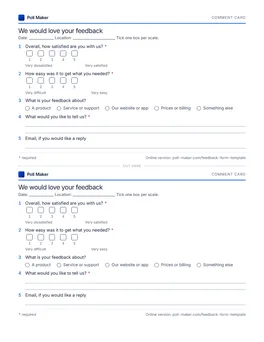
Printable comment cards, two per page
The five short-form fields as a half-page card, twice on one Letter sheet. Leave a stack and a pen by the till, with a box for finished cards.
Download PDFWhere to put your feedback form
The same form can sit in several places. Start with the one closest to the moment people form an opinion.
| Place | How | Version |
|---|---|---|
| Website footer or contact page | Embed the form or link to it | Short |
| Receipt or order confirmation email | A one-line link under the order details | Short |
| Support replies | A link in the signature, or sent when a ticket closes | Short, plus the support questions |
| Counter, table or front desk | A printed QR code, or the comment cards | Short |
| Quarterly check-in with clients | Emailed link | Full |
Making it an anonymous feedback form
For staff suggestions, a school or a community group, people say more when they know they cannot be identified.
What to remove
Take out every field that names someone: the email, your name and the reply question. The short version already asks for no name, and its email field is optional; for a fully anonymous form, delete it.
What to watch
In a small team, answers can identify people even without a name. A department plus a job title can point to one person. Leave those questions out, or use broad groups such as "Office" and "Field".
What to tell people
Say it in the intro: "This form does not ask for your name or email." Then keep the promise. Never try to work out who wrote something, even when you think you know.
Feedback form questions
What should a feedback form include?
A rating, a way to say what the feedback is about, a box for the message and an optional contact field. The short version here adds a second rating for effort, which is often the more useful of the two.
What is the difference between a feedback form and a survey?
A feedback form stays open, and anyone can use it whenever they have something to say. A survey goes to a chosen group, once, with the same questions for everyone. Many teams run both: the form for what comes up, a survey for what they need to measure.
How do I make my feedback form anonymous?
Remove the name, email and reply fields, avoid questions that could identify someone in a small group, and say in the intro that the form does not ask who you are. The section above walks through it.
Should the comment box be required?
On a general feedback form, yes: people open it to say something. On a form that follows a service, where a quick rating is useful on its own, make it optional. Open questions are skipped more often than ratings when they are optional.3 A third option is to ask a different follow-up by score, as this customer feedback form creator does: a low rating asks what went wrong, a high one asks what could be even better.
Where should I put a feedback form?
Wherever the experience ends: the receipt email, your website footer, support replies and a QR code at the counter. The table above shows which version suits each place.
Do customers need an account to leave feedback?
No. Customers follow the link or the QR code and write. You give an email address once, at publishing time, and that is all.
Can I print a feedback form?
Yes. The comment cards above print two to a page. Cut them in half and leave a pile by the till.
Open a feedback form today
Two ratings, a topic and a message box are enough to hear what customers would otherwise only tell their friends.