Technology usage questionnaire on devices, internet and skills, ready to print or send
A technology survey asks people which devices they use, how they get online, what they do there and how confident they feel doing it. Begin with the core 12. Extra sets cover home internet, digital skills, getting help and buying devices, and a table lets you set your group beside the national figures.
- 38questions with answers
- 12in the core set
- 4 minto answer the core
- 2national surveys to compare with
By Michael Hodge, BSc Psychology Updated September 2026
Devices, home internet, online tasks and skills: the full list
The core 12 is already in your survey. Add a whole set or single questions for your job. Each question shows the choices people get plus a line explaining what its result means, ready to open in the builder, print, or copy into another tool.
Core 12: devices, access and confidence12 questions
Four questions on devices, home connection and what people do online, six agree statements on access and everyday skills, the biggest obstacle and an open question. The whole core takes about four minutes.
-
Which of these devices have you used in the past seven days?
SmartphoneLaptopDesktopTabletSmartwatchSmart TVSmart speakerTick all that applyA one-week window separates the devices people use from the ones in a drawer. The national survey asks about each device the same way.8
-
Which device do you use most often to go online?
SmartphoneLaptop or desktopTabletSmart TV or consoleI rarely go onlineTells you which screen to design for. When most people pick the phone, every form, link and document you send has to work on one.
-
At home, do you go online with home broadband (cable, fiber, DSL or satellite), with your phone data, or both?
BroadbandPhone data onlyBothNeitherFinds the people who do everything on a phone plan. Nationally, 16% of adults are smartphone-only.2
-
In the past six months, which of these have you done online?
EmailMessagingVideo callsBankingShoppingSocial mediaGovernment servicesTick all that applyActivities show what people rely on the internet for. The list and the six-month window follow the national survey, so your shares sit next to its figures.8
-
My internet connection is good enough for everything I need to do online.
Strongly disagree12345Strongly agree1 = Strongly disagree, 5 = Strongly agreeSpeed and reliability in one plain test. A low score explains dropped video calls and forms that never get sent.
-
The cost of my internet service is manageable.
Strongly disagree12345Strongly agree1 = Strongly disagree, 5 = Strongly agreeAffordability, asked without making anyone name their income. Disagreement here often sits behind a phone-only answer.
-
I can set up a new app on my phone without help.
Strongly disagree12345Strongly agree1 = Strongly disagree, 5 = Strongly agreeEveryday confidence. People who disagree need someone to show them once, not a link to a help page.
-
I know where to get help when a device or app stops working.
Strongly disagree12345Strongly agree1 = Strongly disagree, 5 = Strongly agreeSupport. Without it, a small fault becomes weeks without access.
-
I can tell when an email, text or website is a scam.
Strongly disagree12345Strongly agree1 = Strongly disagree, 5 = Strongly agreeOnline safety is a skill like any other. Low agreement shows where a short session would protect people most.
-
Technology makes my everyday life easier.
Strongly disagree12345Strongly agree1 = Strongly disagree, 5 = Strongly agreeThe value question. Read it next to the obstacle question, where people who disagree usually say why.
-
What gets in the way most when you use technology?
CostSlow internetKnow-howPrivacy worriesNothing muchOne pick forces a priority. Cost, speed, skills and trust each need a different fix, so this answer tells you which to plan first.
-
What is one thing you would like to do with technology that you cannot do yet?
Open answerThe answers turn into a plan: topics for a class, a help session or a one-page how-to.
Home internet and devices6 questions
For digital inclusion work, broadband planning, or any service about to move online. These go deeper on connection, cost and the devices a household shares.
-
What kind of internet service do you have at home?
Cable or fiberDSLSatelliteWireless or hotspotNoneNot sureService type goes a long way to explaining speed and outages. Plenty of people only know the company name, so "Not sure" is a fair answer.
-
In the past six months, how often did your home internet cut out or slow right down?
NeverOnce or twiceAbout monthlyWeeklyMost daysReliability in a fixed window. Weekly or worse means calls and online forms fail at the worst moment.
-
In the past six months, did your home lose internet for a while because the bill was hard to pay?
YesNoPrefer not to sayThe national survey asks this too. It finds households that are connected, but only just.8
-
If nobody in your home has home internet, what are the reasons?
Too expensiveNot neededNot available hereNo suitable devicePrivacy or safetyI go online elsewhereTick all that applyEach reason needs a different answer. Nationally, most homes without it say they do not need it (55.7%), and 15.4% say it costs too much.3
-
How many working laptop or desktop computers are in your home?
NoneOneTwoThree or morePhones are everywhere; computers are not. Read it with household size to spot homes where three people share one laptop.
-
Where else do you go online when you need to?
WorkSchoolLibraryCafe or storeNowhere elseShows who depends on public places. About one in six people aged 15 and over goes online at a library, community center or park.3
Digital skills check7 questions
Seven everyday tasks, each rated from not at all to extremely confident. Use it before planning a class or help desk, and again afterwards to see what changed.
-
How confident are you joining a video call?
Not at all confident12345Extremely confident1 = Not at all confident, 5 = Extremely confidentDoctor visits, job interviews and family calls now run on video. Low confidence here cuts people off from all three.
-
How confident are you filling in an online form?
Not at all confident12345Extremely confident1 = Not at all confident, 5 = Extremely confidentThe task behind most bookings, benefits and applications. If this is low, keep a paper or phone route open.
-
How confident are you setting who sees your posts?
Not at all confident12345Extremely confident1 = Not at all confident, 5 = Extremely confidentPrivacy settings are where people feel least sure. A ten-minute demo on one app usually fixes it.
-
How confident are you installing device updates?
Not at all confident12345Extremely confident1 = Not at all confident, 5 = Extremely confidentSkipped updates leave phones and laptops open to attack. Low scores point to a simple, teachable habit.
-
How confident are you checking a website is genuine?
Not at all confident12345Extremely confident1 = Not at all confident, 5 = Extremely confidentJudging sources matters for news, health advice and shopping alike. Pair it with the scam statement in the core.
-
How confident are you backing up photos and files?
Not at all confident12345Extremely confident1 = Not at all confident, 5 = Extremely confidentPeople only learn backups after a loss. A low score is a reason to teach it before that happens.
-
How confident are you paying bills online?
Not at all confident12345Extremely confident1 = Not at all confident, 5 = Extremely confidentOnline payments save time and late fees. Low confidence often comes from fear of mistakes, which practice cures.
Learning and getting help5 questions
For anyone planning classes, drop-in help or how-to guides. These show how people prefer to learn and who they call when something breaks.
-
When you get a new device or app, how do you usually learn to use it?
Work it out myselfAsk family or friendsOnline videosA classStore or helplineTells you what format of help people will actually use, from a video to a room with a teacher.
-
When something stops working, who do you turn to first?
Family or friendsAn online searchThe store or makerIT at work or schoolNo one"No one" is the answer to watch. Those people are the first to drop offline when a device fails.
-
Would you come to a free session to build your tech skills?
Yes, in personYes, onlineMaybeNoSizes the demand for a class and says whether to book a room or a video link.
-
Which of these would you most like help with?
Video callsStaying safeAI toolsPhotos and filesOnline formsSpreadsheetsTick all that applyA ready-made syllabus. Run the most-ticked topic first and the room fills itself.
-
Think of the last time technology got in your way. What happened?
Open answerReal stories show the exact step where people get stuck, which a rating cannot.
Buying and replacing devices5 questions
For marketers, retailers and product teams. After the core, customers say how they choose, keep and retire their phones and laptops.
-
How long do you usually keep a phone before you replace it?
Under 2 years2 to 3 years4 to 5 yearsOver 5 yearsThe upgrade cycle. It tells a retailer or carrier when a customer is next in the market.
-
What usually makes you replace a phone or laptop?
It breaksIt gets slowBattery wears outNew featuresA deal or trade-inSeparates people pushed by a failing device from people pulled by something new. Each group responds to a different message.
-
What matters most when you choose a new phone or laptop?
PriceBattery lifeCameraBrandStorageRepairs and supportTick all that applyBuying criteria in the customer's own ranking, the starting point for product pages and store displays.
-
What happened to your last phone when you replaced it?
Still at homeGiven awaySold or traded inRecycledThrown awayShows how many old devices sit unused, which matters for trade-in offers and recycling drives.
-
How likely are you to buy a refurbished device next time?
Very likelyLikelyNot sureUnlikelyVery unlikelyMeasures openness to refurbished stock before you invest in selling it.
About you (optional)3 questions
Add these to compare age groups, places or household sizes. When a group has only a handful of people, fold it into a bigger one before you report.
-
How old are you?
Under 1818 to 2930 to 4950 to 6465 or olderThe age bands Pew Research Center uses, so each of your groups can sit beside the national figure.1
-
Which best describes where you live?
CitySuburbSmall townRural areaHome broadband differs by place: 75% of urban, 84% of suburban and 71% of rural adults have it.1
-
How many people live in your home, including you?
123 or 45 or moreRead it with the computer count. Devices per person matter more than devices per home.
How your answers stack up against the national numbers
Questions 1, 3 and 4 and the age bands mirror two national surveys. Put your own results next to the figures below and look for the gaps.
| Your question | National figure | Source |
|---|---|---|
| How you get online at home (question 3) | 78% of adults have home broadband; 16% go online by smartphone only | Pew, 20251 |
| Devices used (question 1) | 91% of adults own a smartphone; 98% own some kind of cellphone | Pew, 20252 |
| Done online (question 4) | Of internet users 15 and older: messaging 95.1%, email 92.4%, banking 76.1%, video calls 66.1% | NTIA, 20233 |
| Age (About you) | 90% of adults 65 and older use the internet, against 99% of those aged 18 to 29 | Pew, 20251 |
| No home internet (Home internet set) | Main reason: not needed 55.7%, too expensive 15.4% | NTIA, 20233 |
A worked example
Sixty members of a community center answer, and 18 of them pick "Phone data only" for question 3. That is 18 divided by 60, or 30%, almost twice the national 16%.2 The finding to report: nearly one member in three has no home broadband. The plan that follows: every notice, form and booking has to work on a phone screen, and the center keeps a computer free for longer tasks.
Gaps of ten points or more are the ones to chase. Ask a follow-up question about them at your next meeting or in the next round of the survey.
Running a technology survey that reaches everyone
A survey about technology has a built-in trap: the easiest way to send it skips the very people it is meant to find. Four choices fix that and make the answers more exact.
Offer paper and a phone call, not only a link
An online-only technology survey hears mostly from people who find technology easy. In 2025, 96% of US adults used the internet, but among adults 65 and older the figure was 90%.1 In 2023, 12% of people lived in homes with no internet connection at all.7 Leave printed copies at the front desk, bring them to classes and home visits, and read the questions out by phone when that suits someone better. Type the paper answers into the online version so every response ends up in one place.
US adults who go online by smartphone only, by age
Split home broadband from phone-only
"Do you have internet?" gets a yes from someone doing everything on a small phone plan. Pew counts 16% of US adults as smartphone-only, and the share peaks among adults under 30, at 27%, not among older adults.2 Question 3 asks how people get online at home, so you can see who will struggle with long forms, large downloads or video.

Ask about tasks, not about being tech savvy
"How good are you with technology?" means something different to every reader. The Internet Skills Scale, a validated measure of digital skills, instead asks about specific things a person can do, grouped into operational, navigation, social, creative and mobile skills.4 The skills check here follows that approach with seven everyday tasks in our own words, so a low score names a lesson you can teach.
Give every question a time window
Habits are hard to estimate. In a study that logged smartphones for two weeks, people's estimates of how many times a day they used their phone did not line up with the logged counts.5 So the core asks about the past seven days for devices and the past six months for activities, the window the national survey uses.8 A yes or no about a clear period gives a cleaner answer than a guess at minutes.
Opening a workshop or a members' meeting? Put the main-device question to the room with a live poll, show the results on the big screen, then hand out the questionnaire.
Find the weak spot in your group's access
Enter the results for connection, cost, setting up an app, knowing where to get help, spotting scams and everyday value: the six core statements. On all six a high score is the healthy result, so the shortest bar marks where to begin.
- 1Add your counts for every statement, one box for each answer point. Each bar then shows the combined share of Agree and Strongly agree.
- 2If connection or cost is lowest, the fix is access: point people to low-cost plans, lend devices or keep a computer free for public use.
- 3If setting up apps, finding help or spotting scams is lowest, the fix is skills: run one short, hands-on session on that single task.
- 4Split the results by age band or by the home connection answer, then repeat the six statements after your class or program and compare the two charts.
Core statement results
Moving something online? Ask these five first
Before a club, clinic, church or council office moves bookings, payments or forms online, these five show who can follow and who will need another way in.
- 01Which device do you use most often to go online?
- 02At home, do you go online with home broadband (cable, fiber, DSL or satellite), with your phone data, or both?
- 03How confident are you filling in an online form?
- 04I know where to get help when a device or app stops working.
- 05What gets in the way most when you use technology?
Pick the sets that match your job
Keep the core 12 in every version. Core plus one set takes most people six to eight minutes.
| Your job | Add these sets | Who answers |
|---|---|---|
| Plan a digital skills class or help desk | Digital skills check; Learning and getting help | Library users, members or residents |
| Move bookings, forms or payments online | Home internet and devices; Learning and getting help | Everyone who uses the service today |
| Learn which devices your customers use | Buying and replacing devices | Customers or a research panel |
| A class or thesis project | About you, plus one set for your question | Classmates, family, a wider sample |
Some jobs have their own question sets. For staff and the tools they use at work, see the IT survey for employees. For laptops and apps in lessons, use the technology in education questions. To measure hours on screens rather than devices and skills, start from the screen time questionnaire. For why people take up one new system, the technology acceptance model is the research standard, and TV, radio and news habits sit in the media consumption survey.
When a link cannot reach them: print, post or phone
The people with the least access are the ones a link cannot reach. Leave copies at a desk, hand them out at a class, or read them over the phone. Each PDF prints cleanly at home or at the library.
Reading it over the phone? and keep the sheet by the handset.
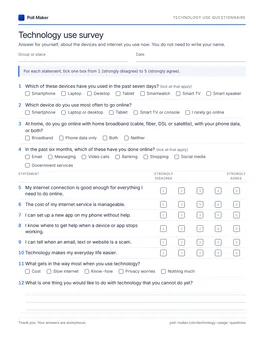
Technology use questionnaire
The core 12 comes first as tick boxes, followed by the home internet, skills, help, buying and About you sets.
Download PDF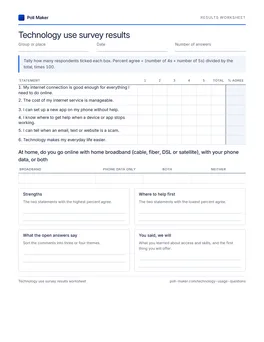
Results tally sheet
Count how people get online at home, find the share who agree with each core statement, then circle the lowest two.
Download PDFUsing the questionnaire for a school or college project
Technology use is a favourite topic for class research because everyone has an answer. These steps make the project hold up when your teacher reads it.
Start from one research question
Say your question is whether people who rely on phone data alone feel less sure of online forms. That needs three items from this page: question 3 on home connection, the online form item in the skills check, and age from About you. Leave the rest out.
Build a two-way table
Sort the answers into a grid with the connection groups down the side and "confident" versus "not confident" across the top, then turn each row into a percent. If the phone-only row has a much smaller confident share, you have a finding to discuss.
Set your sample beside the national one
The table above gives the national figures for connection, devices, activities and age. Saying how your classmates or neighbours compare makes a stronger discussion section than your numbers alone.
Ask first, and try it out
Open with two lines: your name and school, why you are asking, a promise that nobody will be named, and a note that anyone can stop halfway. Check with your teacher before surveying anyone under 18. Then run it past three or four people and reword anything they hesitate over.
Four technology questions that need rewording
Each fix below applies to any questionnaire. For wording and answer types in general, see the guide to survey questions.
Are you good with technology?
How confident are you filling in an online form?
How confident are you joining a video call?
A general rating means something different to everyone. A named task shows exactly what to teach.
Do you have internet access?
At home, do you go online with home broadband (cable, fiber, DSL or satellite), with your phone data, or both?
Nearly everyone says yes. The better version finds the people doing everything on a phone plan.
How many hours a day do you spend on technology?
Which of these devices have you used in the past seven days?
In the past six months, which of these have you done online?
Hours are hard to estimate and blur work with leisure. Devices and activities in a set window are easier to answer honestly.
Is your internet fast and affordable?
My internet connection is good enough for everything I need to do online.
The cost of my internet service is manageable.
Two questions in one. Someone with fast but expensive internet cannot answer truthfully.
Questions people ask about tech use surveys
Short answers for organisers, marketers and student researchers.
What is a technology survey?
A technology survey asks people which devices they use, how they get online, what they do there and how confident they feel with everyday digital tasks. Organisations run one to plan digital skills help, choose the best way to reach people, or decide whether a service can move online.
What should a technology use questionnaire include?
Devices used in the past week, the main device, how people get online at home and what they did online in the past six months. Then agree statements on connection, cost, skills and support, one question on the biggest obstacle and an open question. That is exactly what the core 12 above contains.
How do you measure digital skills in a survey?
Ask about named tasks, such as joining a video call, filling in an online form or backing up photos, and let people rate their confidence on a five-point scale. Task questions are easier to answer than a general rating and point straight to what to teach.
How do I include people who are not online?
Print the questionnaire and leave copies in places people already visit, like a clinic waiting room or a senior center, or read the questions over the phone and type the answers in for them.
Can I use these questions for a school project?
Yes. Pick a single research question, keep the core 12 and About you, and set your results beside the Pew and NTIA figures above. Check with your teacher before you survey anyone under 18.
See how your people really get online
Start the survey in the builder, keep the core 12, choose the set for your job, and share it as a link, a flyer QR code or a printed copy at the front desk.